Overview
Package overview
The Windows 7 Codec Pack is intended for Windows 7 PCs that need broader media playback support without replacing the familiar Windows Media Player workflow. It is especially relevant for Home Premium, Professional and Ultimate systems where older DirectShow components may not handle newer containers, audio formats or video compression types reliably.
This pack is in a support-maintained stage for Windows 7. Some components are kept at versions that remain suitable for Windows 7 rather than being replaced with newer builds that add size without improving Windows 7 playback. It is a practical option for older PCs, offline PCs, and users who cannot reasonably upgrade Windows.
Playback coverage
Support for common audio and video compression types, containers and subtitle filters.
Simple or advanced setup
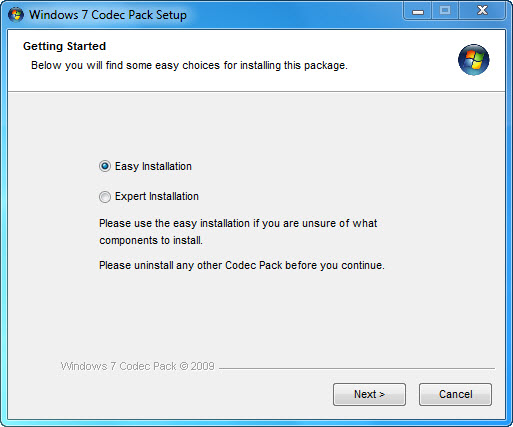
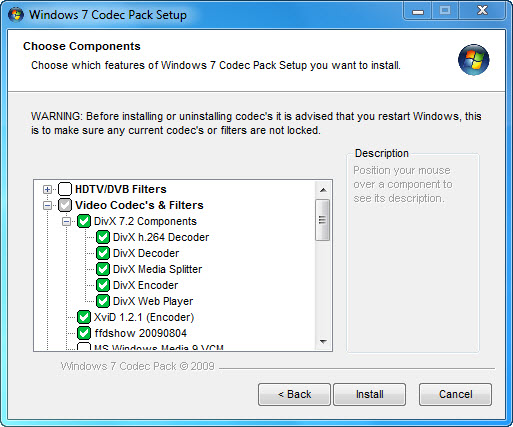
Choose recommended defaults or review codec, filter and splitter options during installation.
Windows 7 integration
Utilities support thumbnails, disc handling, settings management and audio profile switching on compatible Windows 7 systems.
Windows 7 editions
Clear messaging for Windows 7 Home Premium, Professional and Ultimate users, with 32-bit and 64-bit support.
Compatibility
Focused on the Windows 7 playback stack.
A codec is software capable of encoding or decoding video and audio data from files, streams and broadcasts. This package focuses on codecs, filters and splitters used by Windows 7-era DirectShow-compatible playback.
Compression types
x265, H.265, HEVC, 10-bit x264, x264, H.264, AVCHD, AVC, DivX, XviD, MP4, MPEG-4, MPEG-2 and more.
File types
.bdmv, .evo, .hevc, .mkv, .avi, .flv, .webm, .mp4, .ts, .m4v, .m4a, .ogm, .ac3, .dts, .flac, .ape, .aac, .ogg, .3gp and more.
Disc and media support
Support for protected Blu-ray, HD-DVD, AVCHD, DVD and CD discs where supported by the playback chain.
What is included
Codec components
- LAV Video Decoder 0.79.2 x86 and x64
- ffdshow DirectShow Video Codec x86 version 1.3.4533 by Cole
- XviD Video VFW Encoder Codec v1.3.7
- x264 Video VFW Encoder Codec v44.2851
- Lagarith Video VFW Encoder Codec v1.3.27 x86
- LAV Audio Decoder 0.79.2 x86 and x64
- Sony DSD Decoder 1.0
- DivX Audio Decoder 4.1
- madFLAC Decoder 1.1.0 x86
- DSP-worx Bass Source Mod Filter/Decoder v1.5.2.0
- Haali Media Splitter/Decoder 16/09/11 x86 and x64
- LAV Splitter 0.79.2 x86 and x64
- xy-VSFilter/DirectVobSub 3.0.0.211 x86 and x64
- CDXA Reader v1.7.13 x86 and x64
- Icaros 3.3.3 x86 and x64
- Application tuning for compatible players
Package utilities
- Media Player Classic Home Cinema 2.3.9 x86
- Disc Handler for double-click playback on Blu-ray disc icons in Windows Explorer
- Codec Settings GUI for codec, graphics and sound settings
- Codec Settings UAC Manager for copying settings between users
- Update Checker that checks for updates once every 7 days as administrator
- Tray Menu for quick utility access and audio profile switching
Installation transparency
The installer may include optional third-party software offers. These help recover distribution costs and fund development and ongoing support. Setup screens disclose the included codec components and file association options, and file associations can be left at the Windows Media Player defaults or unselected during installation.
Support boundary
Codec packs can help resolve many common playback issues, but they do not replace Windows updates, graphics drivers, audio drivers, a compatible media player, or sensible security precautions on an unsupported operating system. Windows 7 is no longer supported by Microsoft, so this pack is best suited to maintained legacy systems, older PCs and offline use cases.
Installer screenshots